Accounts & imports
Set an MT4 or MT5 investor password
A MetaTrader account has a master (trading) password and an investor password. The investor password is read-only: it can see the account and its history, but it cannot place trades. Live sync uses this one, never your master password.
File imports need no password.
Check whether you already have one
Some brokers give you an investor password when the account opens. Look in:
- the email with your account login details
- the Mailbox tab in the MetaTrader desktop app
- your broker's client area or prop firm's dashboard
Not there? Set your own with the steps below. You need your master password. Changing an existing investor password stops anything else that uses the old one, such as another journal or someone you share the account with.
MetaTrader 4 on desktop
-
Log in to the account with your master password.
-
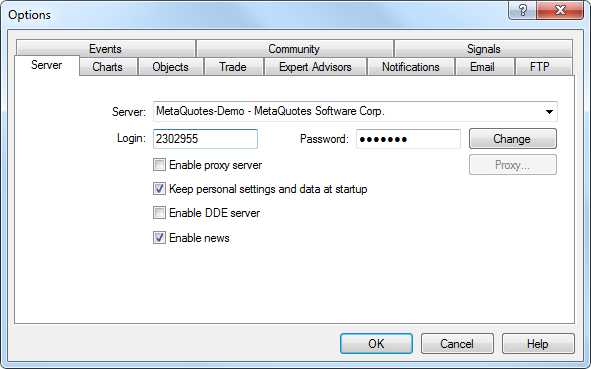
Open Tools → Options and select the Server tab.
-
Check that the right account number is shown, then click Change next to the password.
-
Enter your master password as the current password.
-
Select Change investor (read only) password. If you miss this, you change your master password instead.
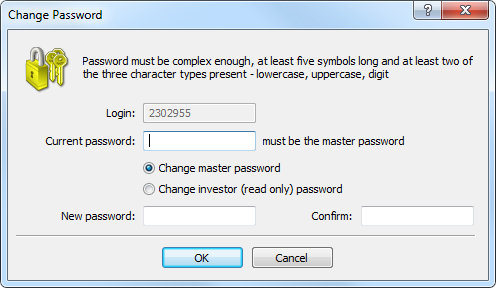
The screenshot shows the default, Change master password. Switch it to Change investor (read only) password.
-
Enter the new investor password, confirm it, and click OK.
Use the desktop app for MT4. If you only trade on a phone, log in to the same account on a computer, or ask your broker.
MetaTrader 5 on desktop
-
Log in to the account with your master password.
-
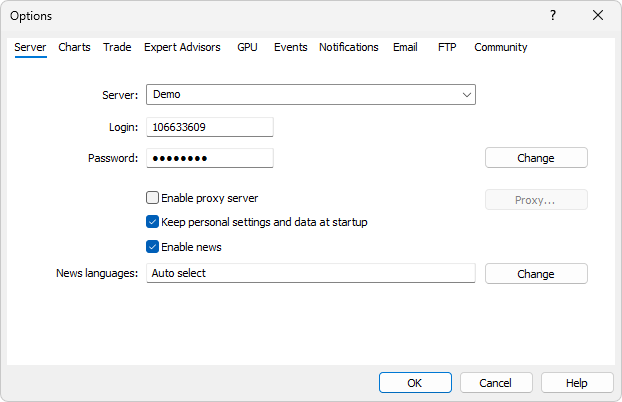
Open Tools → Options and select the Server tab.
-
Check that the right account number is shown, then click Change next to the password.
-
Enter your master password as the current password.
-
Set Password type to Investor. Any other type changes a different password.
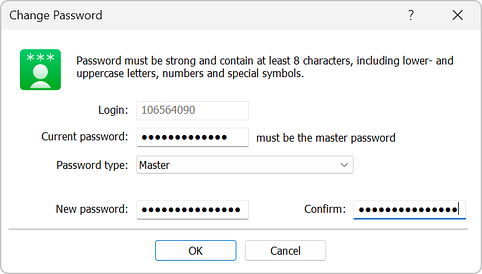
The screenshot shows the default, Master. Switch it to Investor.
-
Enter the new investor password, confirm it, and click OK.
MetaTrader 5 on a phone
-
iPhone or iPad: open the account section and tap Change Password for the current account. Android: open Accounts, open the menu, and tap Change Password.
-
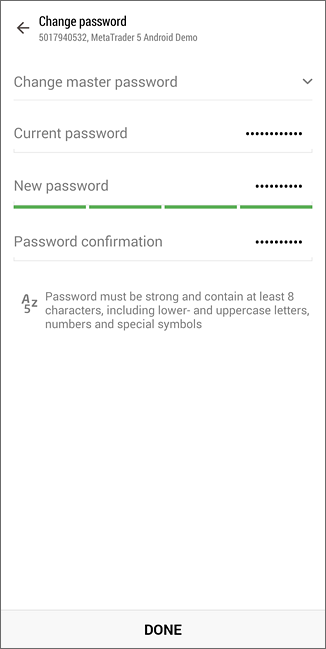
Choose Change Investor Password, not the master password.
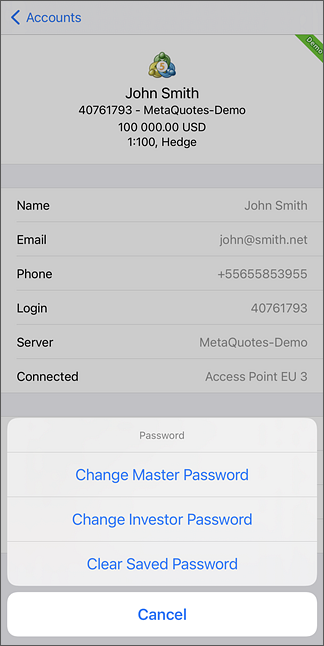
On Android, the list at the top starts on Change master password. Tap it and switch to the investor password.
-
Enter your current master password, then the new investor password twice, and save.
Choose a password MetaTrader accepts
In MT5, use at least the length shown in the window and include a lowercase letter, an uppercase letter, a number, and a special character. It cannot match the current one.
In MT4, the window asks for at least five characters and two of these: a lowercase letter, an uppercase letter, a number. The longer MT5 mix is a better choice there too.
Make it different from your master password, and save it in a password manager.
Check that it is read-only
- In the desktop app, open File → Login to Trade Account.
- Enter the same account number and server with the investor password.
- Your balance and history should load, and you should not be able to place an order. Do not test this by placing an order on a live account: check that New Order or its Buy and Sell buttons are unavailable.
- Log back in with your master password to keep trading.
Then connect live sync. If you enter a password that can trade by mistake, Forexizer refuses it and deletes it.
If it does not work
MetaTrader refuses the change. Check that you entered the master password as the current password, that you are connected, and that the new password meets the rules. If it still fails, set it in your broker's client area or prop firm's dashboard, or ask their support: "Please set or reset the investor (read-only) password for my MT4/MT5 account."
You do not know your master password. MetaTrader cannot show or recover it. Reset it with your broker first.
The investor password stopped working. In MT5, a forced master password change also resets the investor password. Set a new one with the steps above.
You changed your master password by mistake. The old one no longer works. Use the new one to log in, then repeat the steps and choose the investor password.
Your account is with a prop firm. Check the firm's rules on sharing access or changing passwords before you change anything.
Keep it safe
An investor password cannot trade, but anyone who has it can see your balance and trades. Never send it, or your master password, to support, in Discord, or in a bug report. To cut off access, disconnect live sync and change it again in MetaTrader.
MetaQuotes documents these settings for MT4 and MT5. Menu names can vary by version and language. Screenshots are from MetaQuotes' documentation and use demo accounts. MetaTrader is the registered trademark of MetaQuotes Ltd.